pytestなんかを使ってテストを書くとコマンド 1 発でテストを実行してくれて嬉しいです。でも、実行したテストケースと結果をまとめた資料(ここではテスト仕様書と呼ぶことにします)を求められることがあります。
テストはコマンド 1 発なのに、テスト仕様書の作成が手作業はつらいですよね。
pytest-html
pytest-htmlは pytest のプラグインで、pytest で実行したテスト結果を html のきれいなレポートとして出力してくれてとても便利です。ただ、pytest-html のデフォルトの出力ではテスト仕様書と呼ぶには心もとない気がします。少なくとも、ざっくり「テスト内容」と「期待結果」の 2 つくらいは出力したいものです。
そこで、各テストに対して「テスト内容」と「期待結果」を Docstring に記載して、pytest-html のレポートに出力することにします。
Docstring の内容を取り込む
たとえば、以下のようなテストを考えます。
def test_aho():
    """
    Tests:
        3を入力する。
    Expects:
        あほになること。
    """
    assert is_aho(3)
Tests というセクションが「テスト内容」で、Expects というセクションが「期待結果」のことです。ここでは Google スタイルっぽく記述しています。
Docstring をパース…
たとえば以下のようなてきとーなパーサを書きます。(🚧 てきとーなので適宜書き直すなりしてください…🚧)
import re
from itertools import takewhile


_section_rgx = re.compile(r"^\s*[a-zA-Z]+:\s*$")
_lspace_rgx = re.compile(r"^\s*")


def _parse_section(lines: list[str]) -> list[tuple[int, str]]:
    matches = map(lambda x: _section_rgx.match(x), lines)
    indexes = [i for i, x in enumerate(matches) if x is not None]
    return list(map(lambda x: (x, lines[x].strip()[:-1]), indexes))


def _count_lspace(s: str) -> int:
    rgx = _lspace_rgx.match(s)
    if rgx is not None:
        return rgx.end()
    return 0


def _parse_content(index: int, lines: list[str]) -> str:
    lspace = _count_lspace(lines[index])
    i = index + 1
    contents = takewhile(lambda x: _count_lspace(x) > lspace, lines[i:])
    return "".join(map(lambda x: x.strip(), contents))


def parse(docstring: str) -> dict[str, str]:
    """🚧sloppy docstring parser🚧"""
    lines = docstring.splitlines()
    sections = _parse_section(lines)
    return dict(map(lambda x: (x[1], _parse_content(x[0], lines)), sections))
これで(少なくとも上記のテストは)各セクション名とその内容が Dictionary で返ってきます。
conftest.py
conftest.py1 でたとえば以下のように記載して pytest-html のレポートをカスタマイズします。
from datetime import datetime
from py.xml import html  # type: ignore
import pytest

import docstring_parser


def pytest_html_report_title(report):
    report.title = "ナベアツ テスト仕様書" # ついでにレポートタイトルを変更


def pytest_configure(config):
    config._metadata["Version"] = "9.9.9" # ついでにVersion情報を追加


def pytest_html_results_table_header(cells):
    del cells[1:]
    cells.insert(0, html.th("Tests"))
    cells.insert(1, html.th("Expects"))
    cells.append(html.th("Time", class_="sortable time", col="time"))


def pytest_html_results_table_row(report, cells):
    del cells[1:]
    cells.insert(0, html.td(report.tests)) #「テスト内容」をレポートに出力
    cells.insert(1, html.td(report.expects)) #「期待結果」をレポートに出力
    cells.append(html.td(datetime.now(), class_="col-time")) #ついでに「時間」もレポートに出力


@pytest.hookimpl(hookwrapper=True)
def pytest_runtest_makereport(item, call):
    outcome = yield
    report = outcome.get_result()
    docstring = docstring_parser.parse(str(item.function.__doc__))
    report.tests = docstring["Tests"] #「テスト内容」を`report`に追加
report.expects = docstring["Expects"] #「期待結果」を`report`に追加ちなみにですが、ほとんど公式のユーザーガイドに記載されているコードと同じです。
生成されるレポート
あとはテストを実行してレポートを生成するだけです。
pytest --html=report.htmlすると report.html として以下のレポートが生成されました。
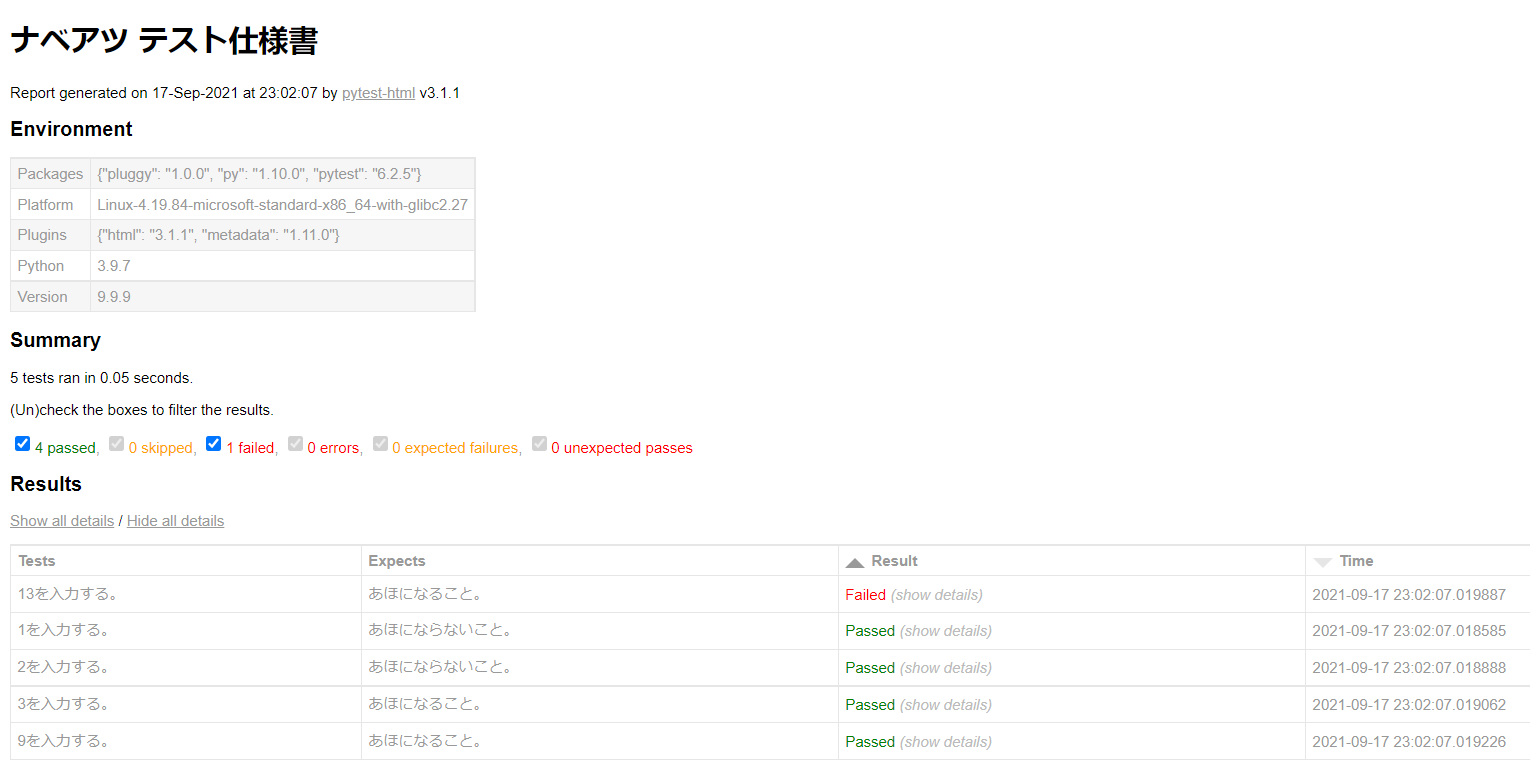
「テスト内容」と「期待結果」がありそれに対する「テスト結果」がまとまっていて2、最低限はテスト仕様書っぽくなりました。やったね。
おわりに
今回レポートを生成したいというモチベーションから各テストに「テスト内容」と「期待結果」を Docstring に記載しましたが、結果としてテストも読みやすくなって良いかんじな気がします。
今回使用したソースコードは一応GitHubにもあげているのでよければ参考にしてみてください。